A GUI API client for VS Code that saves plain .http files
Plainwire gives you a form-style request editor (method, URL, params, headers, body, auth, Send) and a response viewer right inside VS Code, Cursor, Windsurf and VSCodium. There is no login, no account and no limit on requests, collections or runs. Every request is saved as a plain .http file in your repository, in the same format REST Client and the JetBrains HTTP Client use, so git is your sync and teammates without the extension can still read and run them.
VS Code Marketplace and Open VSX listings are coming soon. Until then, install from the release file below.
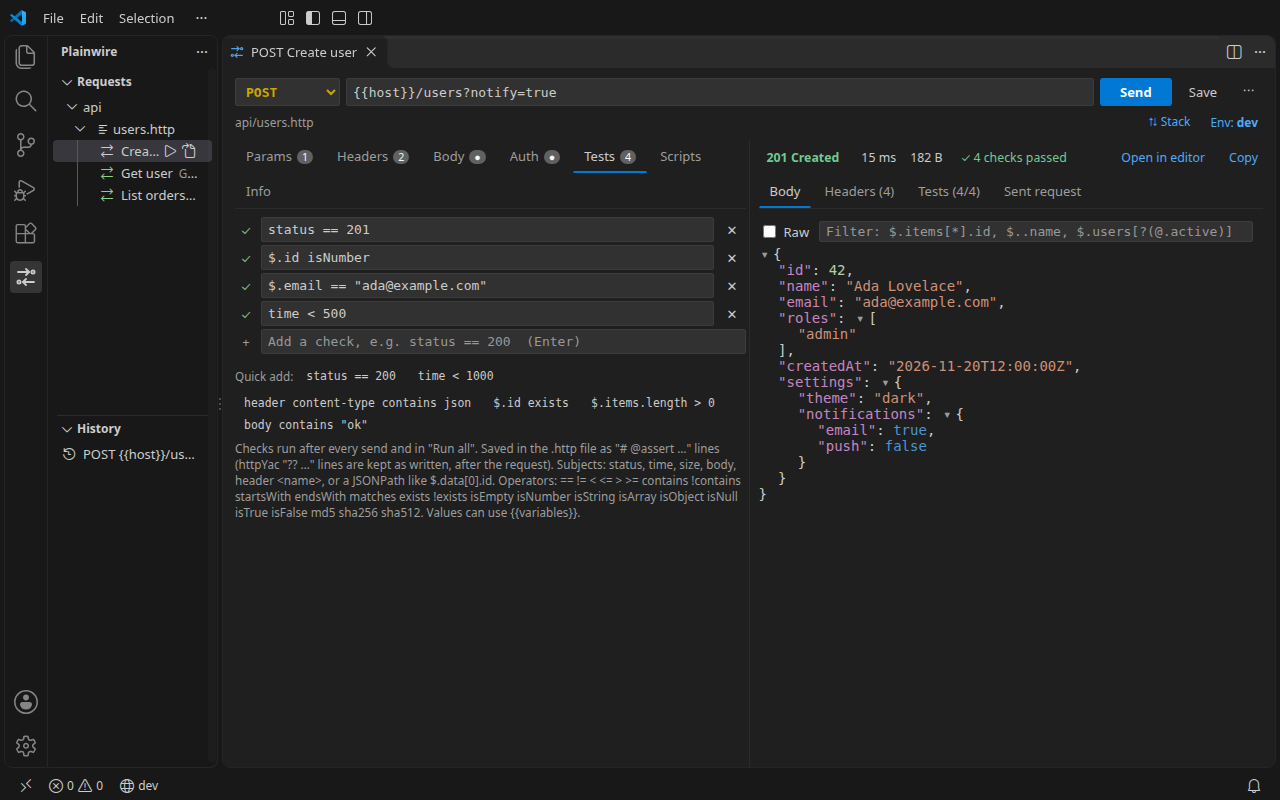
.http file.Install
- Download
plainwire-0.17.0.vsixfrom the latest GitHub release. - Install it. In VS Code, Cursor, Windsurf or VSCodium open the Command Palette (Ctrl+Shift+P, or Cmd+Shift+P on macOS), run Extensions: Install from VSIX… and pick the file. Or from a terminal:
code --install-extension plainwire-0.17.0.vsix
cursor --install-extension plainwire-0.17.0.vsix
codium --install-extension plainwire-0.17.0.vsix
- Open any folder with a
.httpfile (or create one). A Send Request and an Open in editor link appear above each request. Requires VS Code 1.85 or newer, or an editor built on it.
Listings on the VS Code Marketplace and on Open VSX (the registry Cursor, Windsurf and VSCodium use) are coming soon.
What you get in v0.17
Request editor
Method, URL, a query-params table, a headers table, JSON / text / form bodies, and Bearer or Basic auth helpers. Press Send.
Response viewer (filter new in 0.14)
Next to the request, with a draggable divider. Status, time and size at a glance; a collapsible JSON tree you can filter with JSONPath ($.items[?(@.active)].id) or text, and + Add as test to turn a value into a check.
Plain .http files
Saved in your repo in the REST Client / JetBrains HTTP Client format: ###, @var = value, {{var}}, # @name.
CodeLens in any .http file
Send Request and Open in editor above every request, including files you already have.
Environments
http-client.env.json, http-client.private.env.json for secrets, and the rest-client.environmentVariables setting. How it works.
Scripts (new in 0.13)
JetBrains-style JavaScript in the file: < {% %} before a request to sign it, > {% %} after it for client.test and client.global.set('token', …). Imported Postman pm.test scripts run too. How it works.
WebSocket (new in 0.12)
Open a WebSocket from the same file: send messages, wait for replies with === wait-for-server, see every message both ways, and check the replies with messages[-1].data. JetBrains syntax. How it works.
Folders and drag and drop (new in 0.11)
The sidebar shows your folders, files and requests. Drag requests between files, reorder, rename, duplicate and delete; move files into folders. Every edit keeps the rest of the file as it was. How it works.
OAuth 2.0 tokens (new in 0.10)
Write {{$auth.token("my-api")}} and the token is fetched, cached and refreshed: Client Credentials, Authorization Code with PKCE, Password, Device flow. JetBrains-compatible config. Set it up.
Environment editor (updated in 0.15)
Edit http-client.env.json in a form: environments as tabs, a Secret box that writes the value to the git-ignored private file, and nothing you did not touch is changed. Send a request that needs another environment’s {{host}} and the error offers Use dev and send.
Cookies and session logins (new in 0.9)
Log in once: the session cookie is sent with the requests after it, redirects included. A Cookies tab, # @assert cookie sid exists, and the same jar in the CLI. How it works.
Server-sent events (new in 0.7)
Streaming responses show event by event, with Stop, # @max-events and checks on events[0].data. Test SSE and streaming APIs.
Shared files (new in 0.6)
# @import ../shared/auth.http brings in another file’s variables and its login request, so every file reuses one token. How it works.
Variables and chaining
{{$guid}}, {{$timestamp}}, {{$randomInt}}, {{$datetime}}, {{$processEnv}}, {{$dotenv}}, and {{login.response.body.$.token}}.
Sidebar
Every .http and .rest file in the workspace, in its folders, and a history of sent requests, kept locally.
One-click import (Thunder storage new in 0.17)
Thunder Client straight from its storage on your computer, no export or login (how), plus its exports and thunder-tests folders, Postman v2.0/v2.1 collections and environments, OpenAPI 3 / Swagger 2.0 definitions (YAML or JSON, from a file or a URL), and cURL commands.
GraphQL (new in 0.4)
Query and Variables editor, written to the file as REST Client’s X-REQUEST-TYPE: GraphQL format, so existing files just work. Syntax and examples.
Copy as code (new in 0.4)
Any request as cURL, JavaScript or Node.js fetch, Python requests, Go, HTTPie, PowerShell, wget, C#, PHP or Java, with variables resolved.
CLI and GitHub Action for CI
Run the same files in your pipeline: plainwire run api/ --env ci --junit results.xml. One file, Node 18+, no account, PR annotations. Set it up.
Tests and Run all
Response checks as # @assert status == 200 comment lines, and a runner for a whole file or workspace with a pass/fail report. httpYac’s ?? status == 200 lines run too. How it works.
No login, no telemetry
No account and no limits. The extension makes no network calls except the requests you send. Requests go out from the extension host (Node), so there are no CORS problems.
Since 0.2: any port, self-signed certificates (# @insecure) and HTTP proxies; see certificates, ports and proxies. Not yet: GraphQL schema autocomplete and gRPC. JavaScript scripts arrived in 0.13 (guide). WebSocket arrived in 0.12 (guide). OAuth 2 token flows arrived in 0.10 (guide).
Your requests are just text
This is a complete Plainwire collection. It lives next to your code, diffs cleanly in pull requests, and runs unchanged in REST Client or a JetBrains IDE. Plainwire opens the same file as a form when you want one.
Environment values such as baseUrl come from http-client.env.json; the token from the first request is reused by the second through # @name login.
See the .http syntax cheat sheet for everything the format can do.
# api/auth.http
@contentType = application/json

### Log in
# @name login
POST {{baseUrl}}/auth/login
Content-Type: {{contentType}}

{
  "email": "ada@example.com",
  "password": "{{password}}"
}

### Who am I
GET {{baseUrl}}/me
Authorization: Bearer {{login.response.body.$.token}}
X-Request-Id: {{$guid}}
Free online converters
The same converters the extension uses, running in your browser. Nothing is uploaded.
Postman, Thunder Client & cURL to .http
Paste an export or a curl command, download .http files and http-client.env.json.
OpenAPI / Swagger to .http
YAML or JSON definition in, one .http file per tag out, with example bodies, auth and a status check per request.
.http to cURL, fetch, Python & more
Turn .http requests into snippets for 11 languages and tools, variables resolved.
Guides
A free Thunder Client alternative without login
What changed, a feature comparison, and how to move your collections.
A REST Client alternative with a GUI
Same .http files, plus the most-requested REST Client features: run all, tests and a CLI.
Thunder Client collections to .http files
Import straight from Thunder Client’s storage or an export, and how each field maps to the format.
Where Thunder Client stores its data
The folder per OS and editor, what each file is, and getting your requests out with no export or login.
Postman collections to .http files
Collections, folders, auth and environments to http-client.env.json.
cURL to .http and back
Every common cURL flag and its .http equivalent.
.http file syntax cheat sheet
Requests, headers, bodies, variables, environments, system variables, chaining.
Environments: http-client.env.json
Public and private env files, $shared, selecting an environment, secrets out of git, --env in CI.
Organize API requests in folders
Collections as files, folders as folders: drag, reorder, rename, duplicate, and what each does on disk.
OAuth 2.0 tokens in .http files
Client Credentials, Authorization Code + PKCE, Password and Device flow, cached and refreshed, in VS Code and CI.
Cookies and session logins in .http files
A cookie jar: log in once, later requests send the session cookie, in VS Code and CI.
A WebSocket client in VS Code
Send messages, wait for replies and check them, from a .http file and in CI.
Server-sent events (SSE) in VS Code
Watch a text/event-stream arrive, stop it, and test it in CI.
Share variables and a login between .http files
# @import a shared file: variables, chained login, precedence, CI.
API tests in .http files
# @assert checks, Run all, and converting Thunder Client and Postman tests.
Pre-request scripts and tests in .http files
JetBrains < {% %} and > {% %} scripts, client.global, and imported Postman pm scripts.
Run .http files in CI
The free plainwire CLI and GitHub Action: JUnit XML, exit codes, environments and secrets.
GraphQL requests in VS Code
Query + variables in a .http file, auth, checks on errors, and CI.
A Postman alternative inside VS Code
No sign-in, plain files in git, a fair comparison and a two-minute migration.
An API client for Cursor, Windsurf and VSCodium
Install from VSIX, what we test on, and why plain files suit AI editors.
Self-signed certificates, proxies and localhost
# @insecure, proxy settings, redirects and connection errors.
FAQ
Is it really free?
Yes. Plainwire is MIT-licensed open source. There is no paid tier, no account, and no cap on requests, collections or runs. There are no ads.
Does it phone home?
No. The extension collects no telemetry and makes no network calls of its own; the only traffic it creates is the requests you send, to the URLs you typed. History is stored locally in VS Code’s workspace storage. The code is public, so you can check this yourself. Details are in the privacy policy.
Does it work in Cursor, Windsurf and VSCodium?
Yes. They are built on VS Code and install the same .vsix file: use Extensions: Install from VSIX… or cursor --install-extension plainwire-0.17.0.vsix (codium for VSCodium). An Open VSX listing, which these editors search by default, is coming soon.
Can I keep using my REST Client files?
Yes, that is the point. Plainwire reads and writes the same .http / .rest format (### separators, @var = value, {{var}}, # @name) and reads the rest-client.environmentVariables setting. Your existing files show up in the sidebar with a Send Request link above each request, and anyone still using REST Client can keep running them.
Why are requests sent from the extension host?
Requests are sent by Node in VS Code’s extension host, not from a browser page, so browser CORS rules do not apply and you can call localhost and internal APIs directly.