Change HTTP request and response headers, and nothing else.
HeaderDial is a small, open-source extension for Chrome, Edge and Firefox. Add an Authorization token for staging, set X-Forwarded-For, strip a Cookie, or add CORS headers while you develop. No account, no analytics, no network requests.
Free, works in Edge too. Open source (MIT).
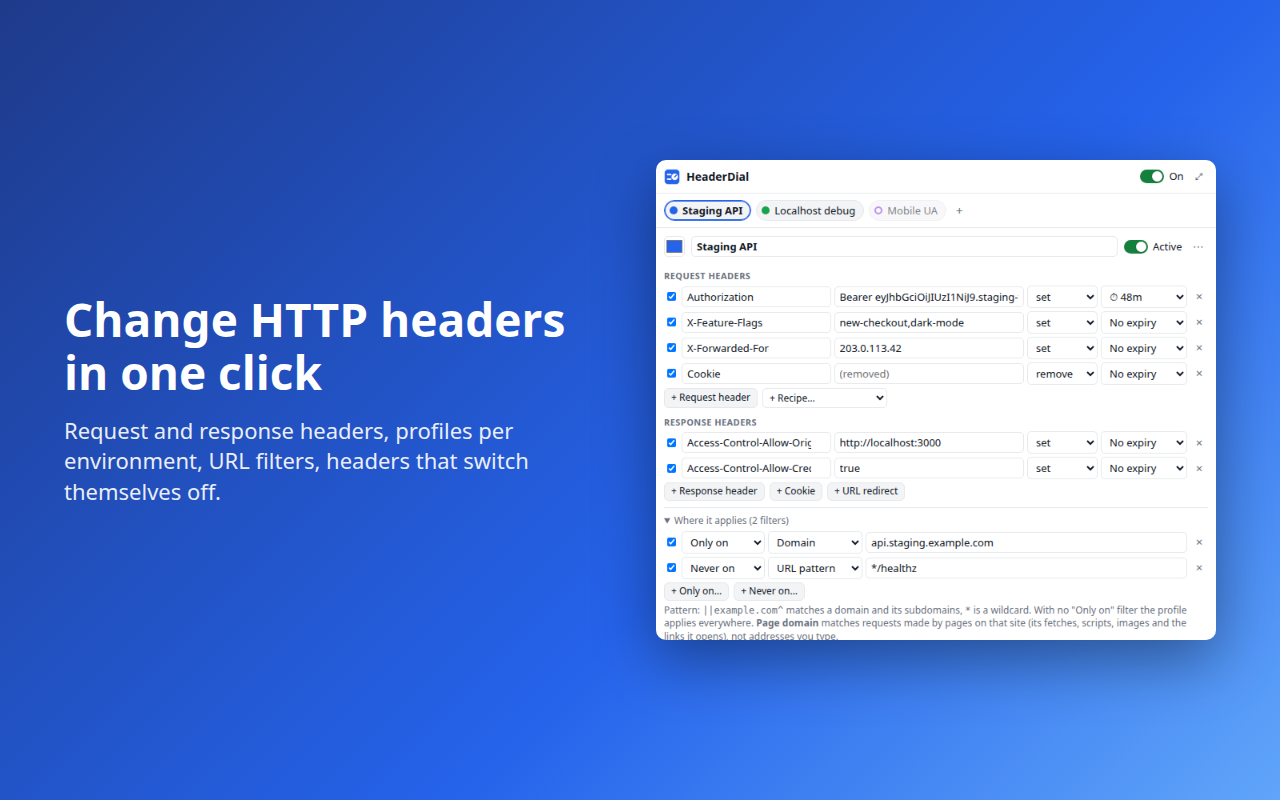
Request and response headers
Set, append or remove any header on requests, and on responses the page receives. Page loads, fetch/XHR, images, scripts and WebSockets.
Profiles
One profile per environment or teammate, each with a colour. Run several at once; the leftmost wins a conflict. One switch, or Alt+Shift+D, pauses everything.
Filters
Limit a profile to domains, URL patterns or regexes, or to requests made by pages on one site. Exclude paths like /healthz without switching off your other profiles, pick request types and methods, or bind it to a single tab.
Headers that switch themselves off
Give a header 15 minutes, an hour or a day. Short-lived tokens stop being sent when they expire, and you see the time left.
URL redirects
Send requests for one URL to another: a production script to localhost, an API version to the next one. Text replacement or regex with groups, on page loads and fetch. How.
Cookies by name
Send one extra cookie with every matching request while keeping the real ones, or store a cookie in the browser as if the server had set it. No cookies permission needed. How.
Recipes for common jobs
Pick + Recipe… to add the usual rows in one click: CORS headers for the page you are on, a site allowed in an iframe, a Bearer token that switches itself off after an hour, a mobile User-Agent, no-cache or X-Forwarded-For.
Copy as curl
Turn a profile into a ready-to-paste curl command for the page you are on, with its headers and cookies, to reproduce a request in the terminal or a bug report. The other way round, paste a curl command to get a profile.
Import from ModHeader, share without a server
Open the JSON your ModHeader profiles were exported to: headers, cookies, URL filters and URL replacements come across. No export? HeaderDial can recover profiles from a disabled ModHeader's data folder. Share a profile as a link; the profile lives after the #, so nothing is uploaded.
Why another header extension?
In July 2026 Google and Microsoft removed the best-known header extension from their stores after researchers found a dormant browsing-history collector inside its signed build (The Hacker News). A tool that sees every request you make should be one you can check. HeaderDial is built for that:
- The code is public and has no build step: the files in the extension are the files in the repository.
- No network requests, no analytics, no remote code. Your profiles stay in the browser's local extension storage.
- Few permissions. It uses the browser's
declarativeNetRequestAPI, so it never reads the content of your traffic: it hands the browser a list of rules, and the browser applies them. Site access is optional and asked for when you need it, for all sites or just the one you are on.
Install
Add to ChromeFirefox: coming soon
Chrome and Edge: HeaderDial on the Chrome Web Store. Edge installs extensions from the Chrome Web Store too: how. Store installs update themselves.
Firefox: submitted to Firefox Add-ons on 20 November 2026 and in Mozilla's review (Firefox 128 or later). The Firefox button above becomes a Firefox Add-ons link the day it is approved.
After installing, pin HeaderDial to the toolbar, click it, add a header, and choose Allow on all sites (or only the site you are on).
Guides
- Add an Authorization header in Chrome
- Add CORS headers for local development
- CORS error explainer (paste the console error, get the fix)
- Why was my cookie blocked? (paste the Set-Cookie warning, get the fix)
- Set X-Forwarded-For in the browser
- Security headers checker (paste response headers, try the fixes)
- ModHeader alternatives compared (2026)
- Moving from ModHeader: import your profiles
- Recover ModHeader profiles from a disabled extension (no export needed)
- All guides